

One review gate, not five
There are two ways to get human judgement into AI video, and both of them are wrong. Generate everything and show the user the damage afterwards, or stop and ask at every single step until "automated" means "a slower manual job". StudioCut asks exactly once — at the storyboard, before anything expensive exists. Here is why that is the right number, and what actually happens after you click approve.
Two bad answers to the same question
Every AI video tool has to answer one question: where does the human go? There are two popular answers and neither survives contact with real work.
The first is full autonomy. Paste a topic, wait, receive a video. It feels like magic exactly once — the first time it happens to be right. The rest of the time you discover the machine misread your product launch as a case study only after it has drawn twenty images, written and spoken a script over them, and assembled the whole thing. The mistake was made in the first ten seconds and paid for in full.
The second is approval at every step. Approve the script, approve the voice, approve the images, approve the scenes, approve the render. Tools that do this describe themselves as automated. They are not — they are a manual job with waiting built in, and they consume more of your attention than editing would, because now you are also babysitting progress bars.
StudioCut takes a third position: ask once, at the point where the answer is still cheap to change.
The one gate: Phase 1
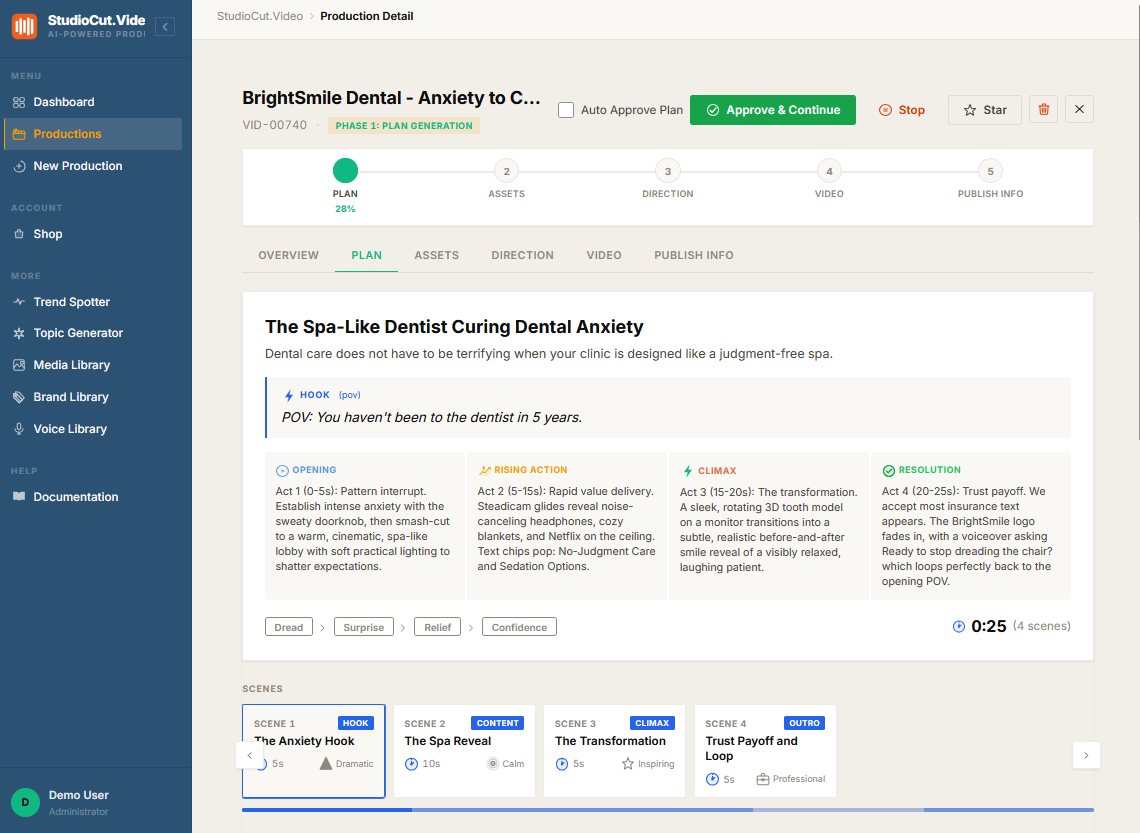
The pipeline runs in five phases — Plan, Assets, Direction, Video, Publish Info. Exactly one of them stops and waits for you: Phase 1. When planning finishes, the production parks, the phase indicator sits on the first circle, and nothing further is generated until you act.
What you are approving is a plan, not a preview. Phase 1 produces the storyboard: a scene-by-scene breakdown with each scene's title, duration, key points, background strategy, and the visual prompt the AI intends to draw from. It is all readable English. You can see precisely what the machine understood and what it is about to do about it.
Everything is editable, and none of it costs anything yet
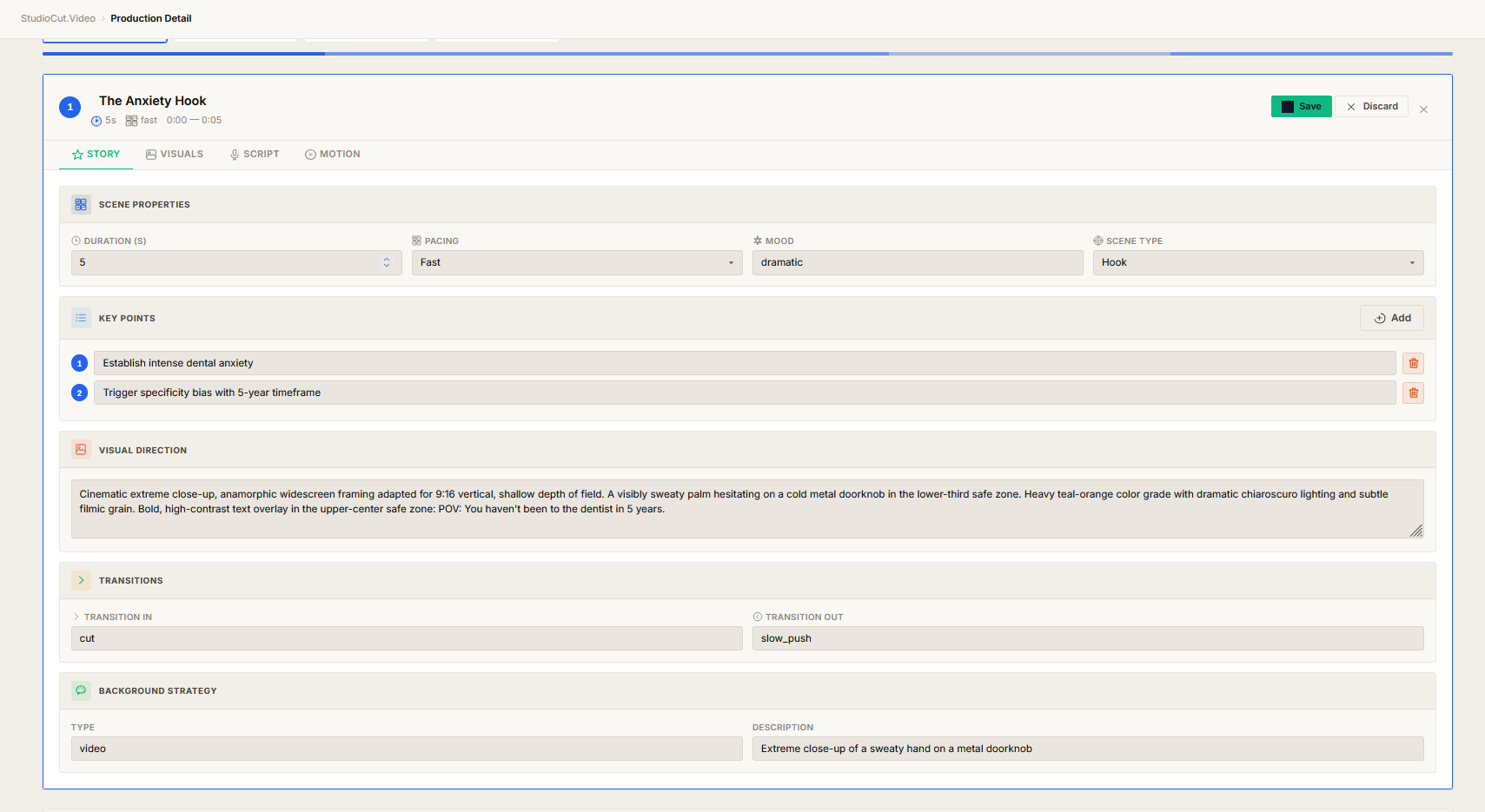
This is the part that makes one gate sufficient rather than merely convenient. At the gate, nothing has been generated — no images, no narration, no render. So correcting the plan is free, and it stays free however many times you do it.
Open any scene and it becomes a form. The scene's duration, pacing, mood and type; its key points as an editable list; the visual direction the image generator will receive; the transitions in and out; the background strategy. Change the sentence that misses your point, click Save, and the plan is now what you meant.
Compare that to the economics everywhere else. With an agency or a freelancer, revision three is a new invoice, which is why people stop asking for fixes they actually want. With a generate-first tool, revision three is another full generation at full cost. Here the expensive step happens once, after you are satisfied, at a price you already agreed to.
What happens after you click approve
Everything. That is the whole design.
Phase 2 generates the assets in parallel — one image per scene from the visual prompt you just read, narration for each scene's script line, and a music bed. Phase 3 directs: each scene gets a layout, motion, your brand colours and typography, and safe zones enforced for the format you are targeting. Phase 4 renders the composite into a finished MP4 with the voiceover locked to scene timing. Phase 5 writes the publishing metadata. None of these ask you anything.
This is worth being precise about, because it is a common misreading of the five-phase structure: there is not a review gate after each phase. There is one gate, at Phase 1. Phases 2 through 5 advance on their own, and the buttons that appear to offer later approvals are vestigial.
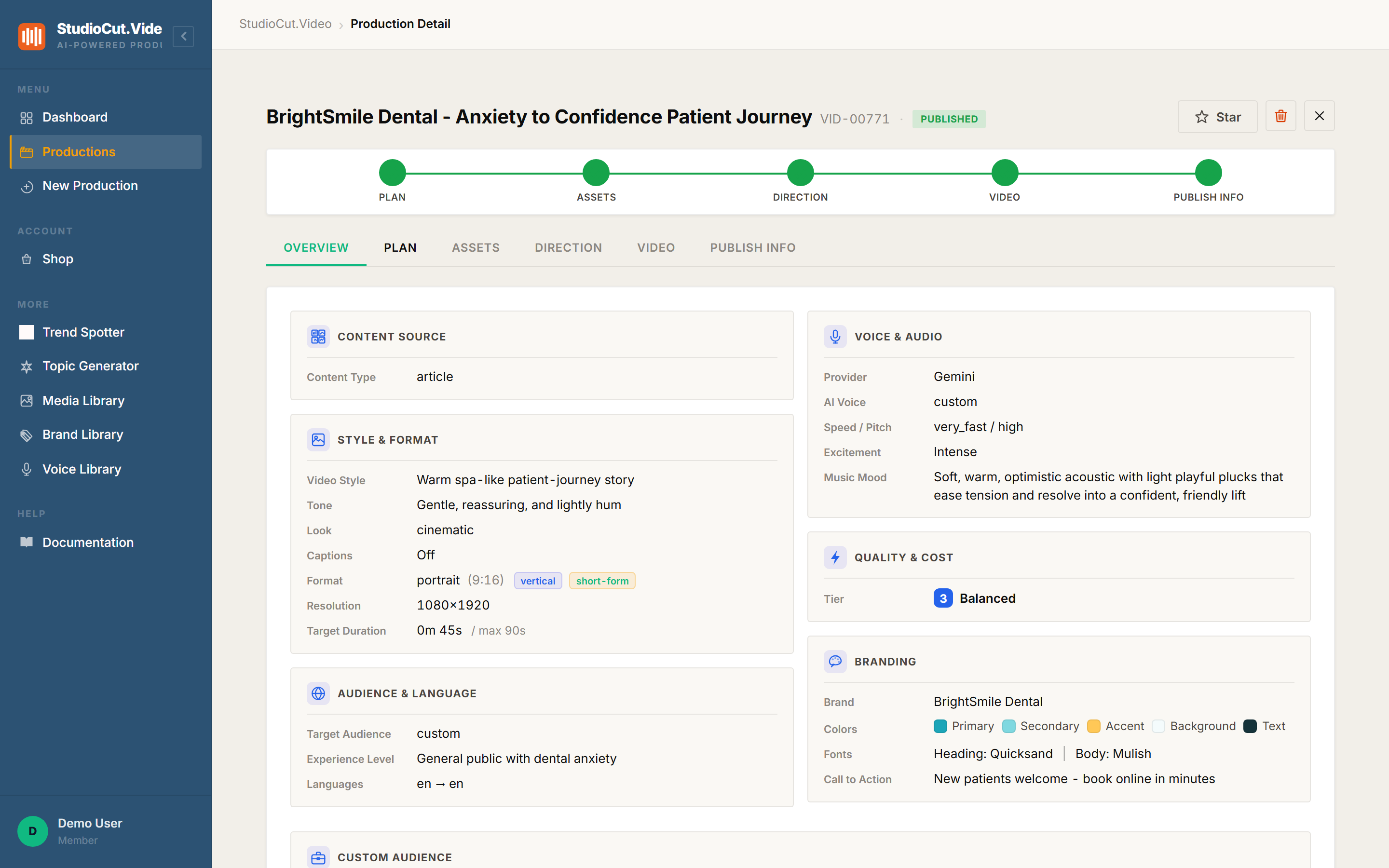
Where the gate does not save you: a failed phase does not silently auto-advance. If a phase errors, the production stops on the error rather than carrying the failure forward — the auto-progression is explicitly skipped for productions in an error state or ones you have stopped.
And if you do not want even one gate
There is an Auto Approve Plan switch. Turn it on and Phase 1 stops waiting too: the production runs from input to publish-ready without stopping anywhere. It is a checkbox in the create wizard and on the production itself, so you can decide per video rather than per account.
The sensible pattern is to leave it off while you are learning what your inputs produce, then turn it on for work you have run a hundred times — the fourteenth product video from the same catalogue template does not need a human reading its storyboard.
Plan-gated: Auto-Approve is a Professional and Enterprise feature. On Free and Starter the Phase 1 gate always applies — which is still only ever one gate.
One gate per production, including variants
If you fan a production out into other languages, each variant is a full production in its own right — and it gets its own single Phase 1 gate. Variants are created parked and waiting, with auto-approve off, so a translated plan never renders before someone has looked at it.
That is consistent rather than contradictory: the rule is one gate per production, not one gate per account. A master plus five language variants is six productions and therefore six approvals — each of them cheap, each of them before any spend on that variant.
Why one is the right number
The argument is about where information lives. A review is only worth your time if, at that moment, you know something the machine does not and acting on it is cheap. Both conditions are true exactly once in this pipeline: at the plan, you know what you actually meant, and nothing has been built yet.
After that, the conditions stop holding. Asking you to approve generated images tells you nothing you could not infer from the plan, and by then changing your mind means regenerating. Asking you to approve the render is asking you to approve a decision made four steps earlier. Extra gates do not buy control — they buy the feeling of control, and charge you attention for it.
The one-sentence version: StudioCut has exactly one human review gate — the Phase 1 storyboard, where fixes are free — and phases 2 through 5 run to a finished, publish-ready video without asking you anything.
Further reading
- Reviewing the storyboard — the step-by-step guide to working the gate.
- Auto-Approve — how to skip the gate, and when you should not.
- How we built the five-phase pipeline — why the work is split this way in the first place.
- What your videos cost — why the price is fixed before the gate, not after it.
Approve once. Let the rest run.
Read one storyboard, fix what the AI misread, and let assets, direction, render and publish info finish on their own. Start free and take a production through the gate.
Get Started Free