

The video is done — and so is the homework
In most tools the render is where the real work starts: write the title, write the description, guess the tags, make a thumbnail, then do it again for every platform. Phase 5 exists so that none of that lands on you. It is the least glamorous phase in the pipeline and quietly the one people notice most.
The last mile nobody budgets for
Everyone budgets for making the video. Nobody budgets for the forty minutes afterwards: writing a title that is not embarrassing, a description that is not three words, tags you half-guess, and a thumbnail you make in a browser tab because the render did not come with one. Do that once a week and it is a working day a quarter, spent on the least interesting part of the job.
Phase 5 exists to hand that back. It runs automatically after the render, and it produces the publishing package for the video that was actually made.
Written from the plan, not from the file
The important detail is where the metadata comes from. It is generated from the same plan the video was built from — the storyboard you approved, with its scenes, key points and narrative arc. Not from a filename, not from a template, and not from a generic prompt about your topic.
That is why the output describes this video. A description generated from the plan can reference the actual argument the video makes, in the order it makes it, because that structure is what it was written from.
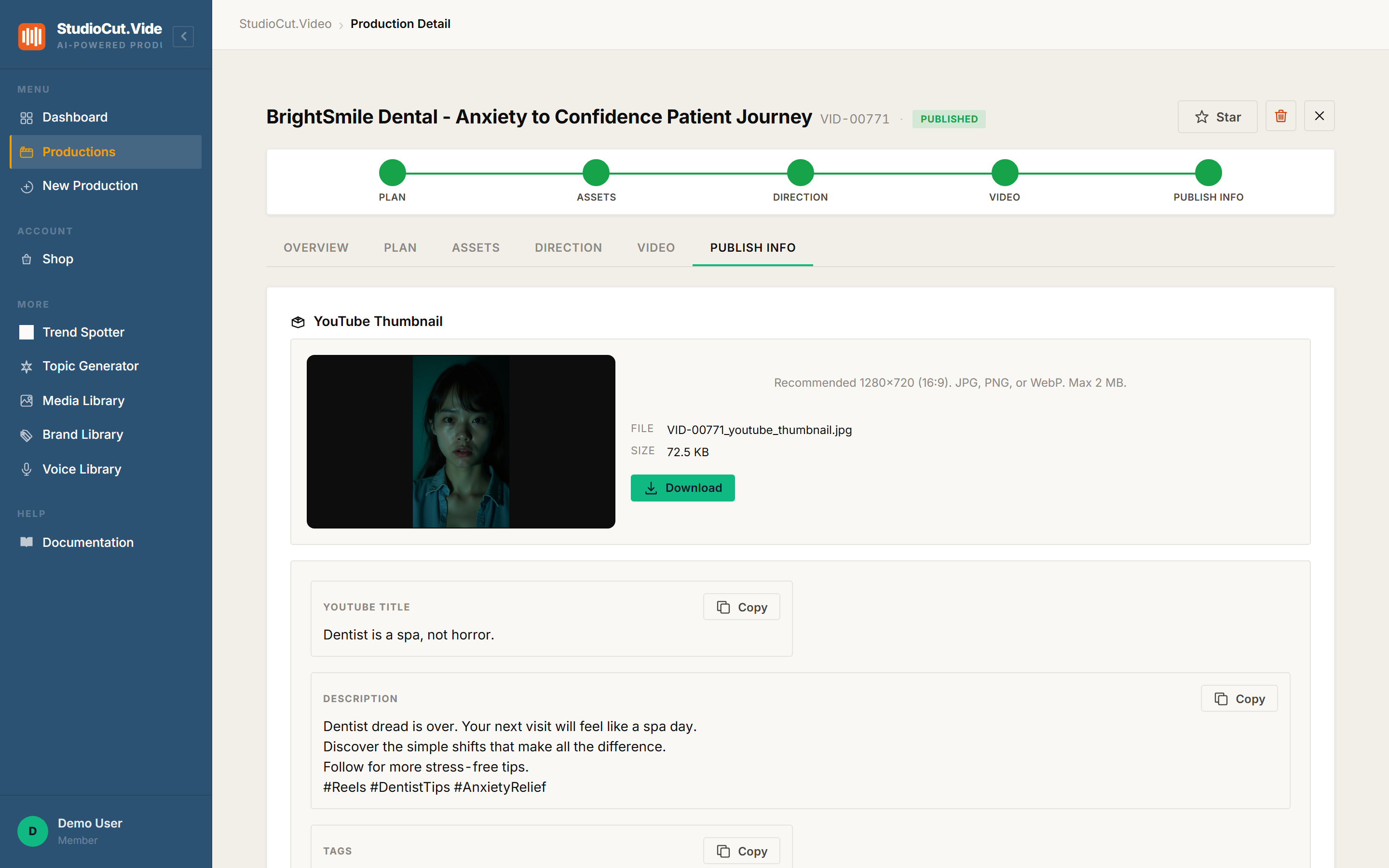
What is in the package
| Field | What you get |
|---|---|
| Title | A written title for the finished video, sized for the platform's conventions rather than truncated at upload. |
| Description | Multi-line copy describing what the video covers, with hashtags where the platform expects them. |
| Tags | A keyword set drawn from the plan's subject matter. |
| Thumbnail | A generated still for the video, with its file size shown and a Download button. Recommended 1280×720; JPG, PNG or WebP, up to 2 MB. |
The thumbnail is a starting point rather than a mandate — you can download it and use it as-is, or upload your own to replace it. For a lot of internal and client work, as-is is fine, and "fine and already there" beats "better and never made".
Per-platform blocks, when they apply
If the production targets several surfaces, the tab also renders a Platform Metadata section with one block per platform — each carrying its own title, tags and description, each with its own Copy button. YouTube Shorts, Instagram Reels and TikTok are recognised individually.
Be clear about when this appears, though: those blocks are produced on the multi-platform and short-form branch. A production aimed squarely at one destination — a plain YouTube video, say — shows the single set of YouTube fields and nothing else. That is not a missing feature; it is the metadata matching the production.
The reason the per-platform version is worth having is that these surfaces genuinely differ. Title length conventions differ, hashtag behaviour differs, and what reads as a good description on YouTube reads as noise on TikTok. Copy-pasting one set of metadata into five places is a habit inherited from having no alternative.
Copy buttons, not a publish button
Every field carries a Copy control, and that is the intended workflow: open the tab, copy, paste into the platform's upload form. Phase 5 prepares the package; it does not post on your behalf.
Direct publishing is a different kind of feature — it means holding channel credentials and taking responsibility for what appears on your account — and it belongs on a roadmap rather than in a blog post pretending it already works. What exists today is the writing, done, with the copying made trivial.
Worth knowing: Phase 5 runs automatically. It is not a gate, and there is nothing to approve — by the time you open a finished production, the publishing fields are already populated.
Why this is the phase people notice
Ask someone what they liked about a video tool and they will talk about the visuals. Ask them what made them keep using it and it is usually something like this — the part where the thing that was always annoying stopped being their problem.
The video was going to get made either way. What changes the arithmetic of publishing weekly is whether finishing the render means finishing the job, or whether it means starting the second, duller half of it.
The one-sentence version: Phase 5 writes the title, description, tags and thumbnail from the same plan the video was built from — per platform where the production targets several — each with a Copy button, ready to paste into the upload form.
Further reading
- One review gate, not five — why Phase 5 never stops to ask you anything.
- One script, every aspect ratio — how productions come to target several platforms in the first place.
- Roadmap — where direct publishing sits.
Finish at publish-ready, not at render
Get the title, description, tags and thumbnail written from the same plan the video was built from — each with its own Copy button. Start free.
Get Started Free