

Pick a voice, or bring your own
Get the voice wrong and nothing else you decided matters — not the script, not the visuals, not the pacing. Most tools hand you a default and move on. StudioCut makes it a choice you actually make: hear the voice first, tune how it delivers, and bring your own if you already have one.
The voice is the video
People forgive a lot in a video. Stock-looking visuals, a slightly odd cut, a title card that lingers. What they do not forgive is a narrator who sounds wrong — too fast, too flat, too enthusiastic about a compliance update. The voice is the thing viewers experience continuously, and it sets whether the whole production reads as considered or as generated.
Which is why accepting whatever default a tool hands you is the single highest-leverage decision most people skip.
A catalogue you can hear
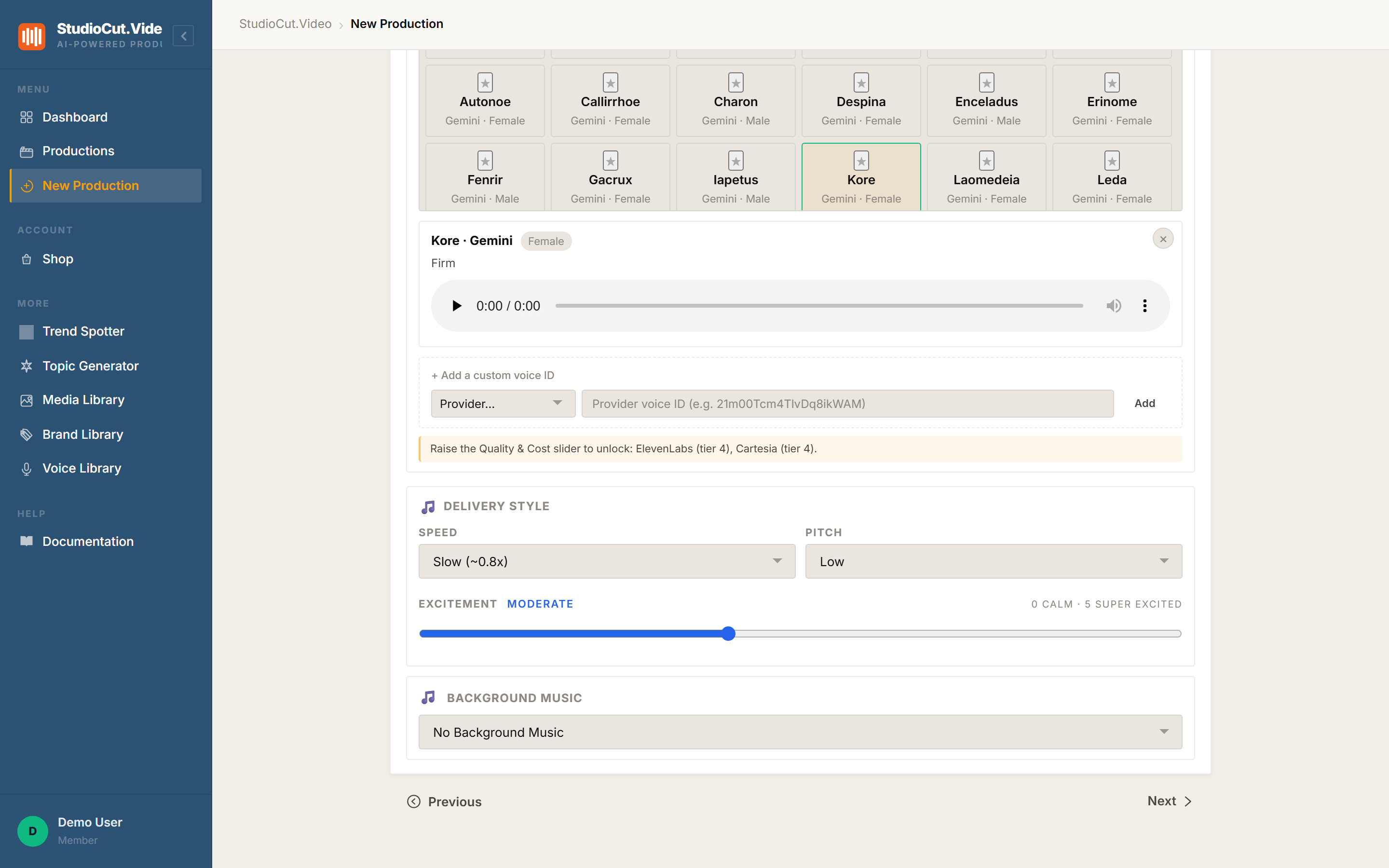
Voice selection happens in Step 2 of the create wizard. The available voices are laid out as a grid of cards, each showing the voice name, its provider and its gender, with a star to save it for later.
Select one and it expands into a detail panel with a short character label — Firm, for example — and an audio player. That player is the point of the whole screen: you hear the actual voice, in the wizard, before it is committed to a production. Not a written description of a voice. The voice.
Delivery is separate from voice
Picking the right voice and then having it read at the wrong energy is a distinct failure, so the delivery controls are their own group:
| Control | What it does |
|---|---|
| Speed | Pace of the read, from slow through to fast — with the multiplier shown, so Slow (~0.8×) means something specific rather than vibes. |
| Pitch | Low through high, independent of speed. |
| Excitement | A slider from 0 (calm) to 5 (super excited), with the current level named as you move it. |
These are worth touching. The same voice at slow-and-low is a patient explainer; at fast-and-high it is a product launch. Most people find the voice they want and then never adjust delivery, and it is usually the cheapest improvement available to them.
Some providers unlock with the quality tier
Not every provider is available at every quality setting. The wizard says so directly rather than hiding the options: a notice under the voice grid names which providers unlock at higher tiers — ElevenLabs and Cartesia both sit at tier 4.
This is a cost decision as much as a quality one. Raising the Quality & Cost slider to reach a premium voice raises the per-30-second rate for the whole production, and the credit estimate moves with it. Worth checking the number before deciding the premium narrator is essential.
Bringing your own voice
If you already have a voice with a provider — a clone you have trained, or a specific catalogue voice you have standardised on — you do not have to re-pick something approximate from the grid.
Under the voice list there is + Add a custom voice ID: choose the provider, paste the provider's voice ID, and add it. The field shows the expected shape of an ID as placeholder text, which saves the usual round of wondering whether you copied the right string.
Two things worth knowing. First, StudioCut does not train or clone voices itself — this brings across a voice that already exists on a provider you use. Second, a custom voice sometimes displays generically on the production summary (as custom rather than by name); the voice used is still the one you specified.
Building a shortlist
The Voice Library page is where saved voices live, with tabs for your own voices and for browsing the catalogue. A new account starts empty — it tells you so, and points at the catalogue.
The workflow it is built for: find a voice you like, save it, and it is waiting in the wizard on every future production. That matters more than it sounds for teams, because the alternative is five people independently picking five different narrators for videos that are supposed to be from the same company.
Worth knowing: voice availability depends on which provider keys are configured and synced. If the catalogue looks thinner than you expect, that is a configuration state rather than the whole selection.
A short method for choosing
Play three candidates on the same script line, not on their demo clips. Demo clips are chosen by the provider to flatter the voice; your script is not. Then set delivery deliberately — decide whether this video is patient or urgent, and move speed and excitement accordingly.
Save whichever survives. You are unlikely to revisit the decision often, which is exactly why it is worth ten minutes once.
The one-sentence version: pick a voice by hearing it in the wizard, set speed, pitch and excitement deliberately, and paste a provider voice ID if you already own the voice you want.
Further reading
- The Voice Library — saving voices and managing your shortlist.
- Score it in two clicks — the other half of the audio decision.
- What your videos cost — how the quality tier that unlocks premium voices changes the price.
Hear it before you commit it
Preview voices in the catalogue, tune speed, pitch and excitement, or paste a provider voice ID you already own. Start free.
Get Started Free