

Multi-Language Production
Produce up to 5 additional language variants from a single source production. The system reuses the storyboard, images, layouts, and music — only the voiceover and metadata are regenerated per language.

Plan-gated: Multi-Language Batch is included on the Enterprise plan only. New to the pipeline? Start with the StudioCut.Video Help Center.
Why this isn't just "translation"
Mechanical translation produces text that reads correctly but plays awkwardly in voiceover (wrong cadence, wrong cultural framing, inappropriate idiom). Studio Cut Video's variant flow:
- Adapts cadence to each target language's natural pacing.
- Re-times scenes if the translated script is shorter or longer than the source.
- Re-runs voiceover generation in the target language with a voice that supports it.
- Re-generates Phase 5 metadata (title, description, tags) with language-appropriate keywords for discoverability.
- Shares non-voice assets by reference — images, music, transitions, layouts are not duplicated, so storage and render cost stay low.
Setup — picking your languages
In the Create Wizard, Step 2 (Voice & Audio):
- Voiceover Language + Content Language — paired side-by-side. Set them for the master production.
- + Also generate for additional languages (Batch) — click to expand the batch panel. Each row picks a Voiceover language and a Content language for one variant. Add up to 5 rows.
A token-cost notice is always shown inside the batch panel — it tells you exactly how many tokens each additional language adds, plus the running total. Read this before adding languages — variants run the full pipeline so they cost the same as the master.
Save and complete the wizard. The production is created as the master.
What happens during production
Master production
  Phase 1 (Planning)             one storyboard, in source language
  Phase 2 (Asset Generation)     one set of images, music, layouts
  ↓ Variants spawn automatically once master Phase 2 completes
  Variant 1 (e.g. Spanish)       sits at its own "Approve & Start (Voiceover)" gate
  Variant 2 (e.g. French)        sits at its own "Approve & Start (Voiceover)" gate
  Variant 3 (e.g. German)        sits at its own "Approve & Start (Voiceover)" gate
  ...
Phase 1 and Phase 2 run once on the master. Once master Phase 2 (Asset Generation) completes, the variants are spawned automatically as separate productions — but each variant waits for you to approve its own Voiceover (Phase 2) start gate before its voiceover and downstream phases run.
A pending-variants banner is shown on the master before fan-out: "X language variant(s) queued: [DE, FR, ES, JA, PT] — will spawn automatically once Phase 2 (Asset Generation) completes. Each variant then waits for you to click Approve & Start (Voiceover)."
This means:
- Shared cost on Phase 1 + master Phase 2. Storyboard and shared assets paid once.
- Per-variant approval. Each variant gives you the chance to inspect the localised plan before its voiceover runs.
- Independent voiceovers. Each variant generates its own narration audio in its target language.
- Independent downstream phases. Each variant runs Phase 3 (Direction), Phase 4 (Render), and Phase 5 (Publishing) on its own.
- Independent metadata. Each variant gets its own optimised title, description, tags.
Navigating between variants
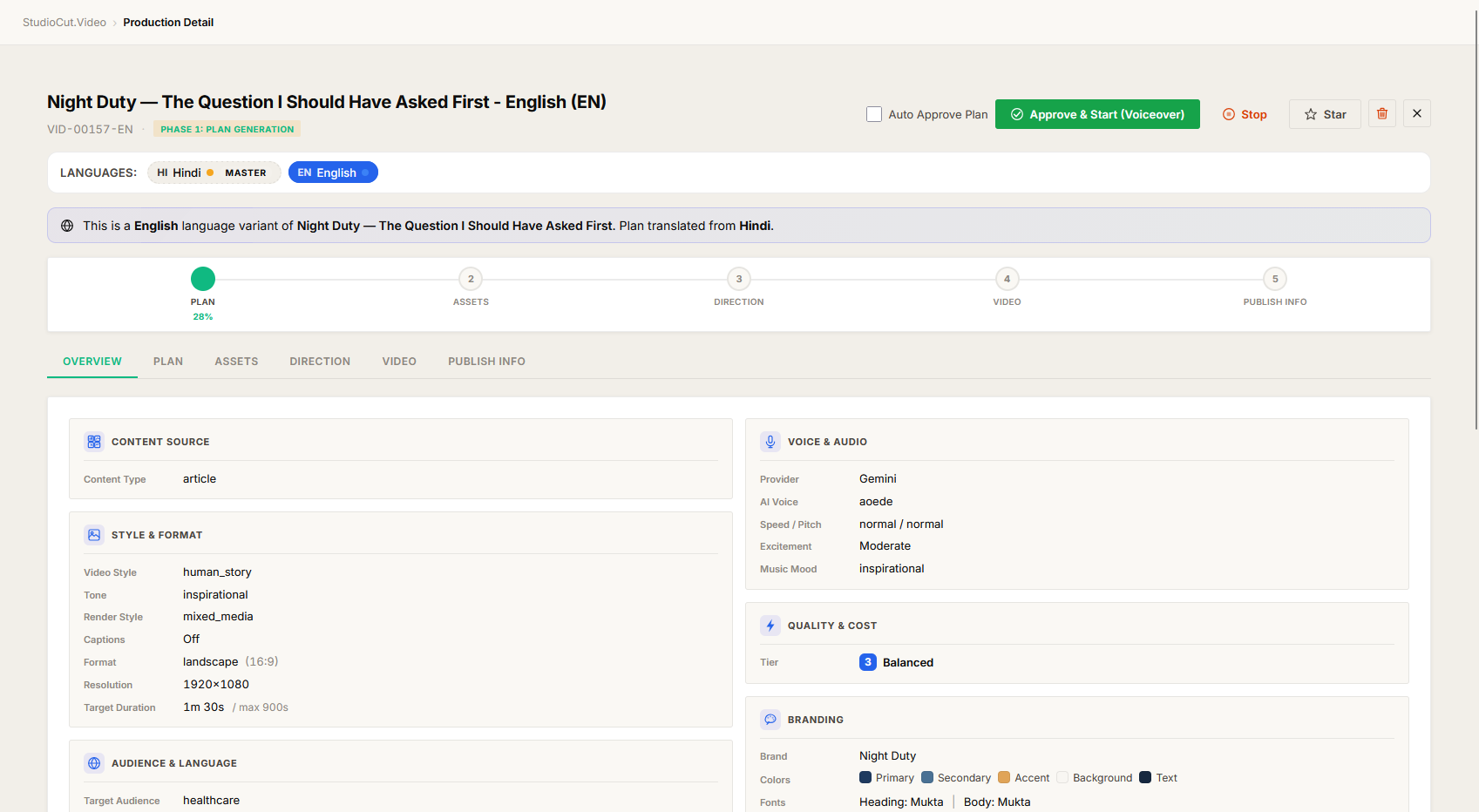
Once variants have spawned, every production page (master + variants) shows a language sibling switcher in the page header. Pick any language to jump to that variant.
A variant production also displays a banner at the top: "This is a <Language> language variant of <master name>. Plan translated from <source language>." Click the master name to jump back.
The pending-variants banner (described above) is shown on the master while variants are still queued.
You can also see all variants together in the Productions listing — they share a project relationship and cluster visually.
Per-variant review
Each variant runs its own Phases 3, 4 and 5 to completion without pausing. You can:
- Approve each independently.
- Reject one variant without affecting the others (e.g. "the German voiceover sounds too formal, regenerate").
- Use Auto-Approve on the master and inherit it across all variants — the variants run unsupervised once the master is approved through Phase 2.
Real scenarios
Scenario A — Global product launch
A SaaS company is launching in 6 markets simultaneously: English (source), Spanish, French, German, Japanese, Brazilian Portuguese.
- Creates master production in English. Adds 5 batch rows:
es, fr, de, ja, pt. Reads the token-cost notice and confirms the budget. - Approves master Phase 1 (English storyboard) and master Phase 2 (assets).
- Five variants spawn automatically. Each variant sits at its own Approve & Start (Voiceover) gate.
- With Auto-Approve enabled on each variant (or by clicking through five times), each variant proceeds through its voiceover, Phase 3 (direction), Phase 4 (render), and Phase 5 (metadata).
- Six fully localised videos are ready (1 master + 5 variants), each with its own platform-optimised metadata.
Cost vs. running 6 unrelated productions: storyboard generation paid once; image/music generation paid once on the master; voiceover paid 6 times (necessary anyway); downstream phases paid 6 times.
Scenario B — Selective regeneration
Out of 5 variants, 4 sound great. The Japanese variant has a voice that doesn't quite fit the brand.
- Open the Japanese variant's production page.
- Open the Edit Production modal, change the voice.
- Reject Phase 2 of just that variant. Voiceover regenerates with the new voice.
- Other 4 variants are untouched.
Scenario C — Adding a language late
Initial run was English + Spanish. Two weeks later, demand for French.
Currently this requires creating a fresh production rather than adding to an existing master. (Adding languages to an in-flight master is on the roadmap.) Keep your wizard inputs and brand preset and the new run will look identical.
Tips & gotchas
- Pick voices that support all your target languages. Some voices are English-only; the wizard greys out incompatible voices when you've selected additional languages. Shortlist multilingual voices first in the Voice Library.
- Storyboard quality compounds. A great Phase 1 yields 6 great variants; a mediocre one yields 6 mediocre variants. Spend extra time on the master's Plan review.
- Variants don't share Phase 5 metadata. Each gets its own AI-generated YouTube package — reflecting language-appropriate keywords, idiom, and even title-length conventions (German titles wrap differently than English).
- Quota counts variants. A 5-language batch consumes 6 monthly video slots (master + 5 variants). Check your plan headroom before you start.
- Storage savings only on non-voice assets. Each variant's voiceover and metadata is its own file; image/music files are deduplicated by reference.
- Cancel doesn't refund variant slots either. Once fan-out has fired, those variant slots are committed.
See also
- The Create Wizard — Voice step is where languages are selected.
- Reviewing Phases 2–5 — same review flow per variant.
- Auto-Approve Mode — the recommended companion for multi-language batches.
- Multi-Format Production — different problem, same idea (one input → many outputs).